WPITCOM LogoWPITCOM Logo
  • Home
  • About us
    • About us
    • Jobs & Career
  • Digital Signage
    • WPITCOM Signage Solutions
    • WPITCOM Signage Manager 3
      • WPITCOM Signage Manager 3 Cloud CMS
      • WPITCOM Signage Suite 3 Media Player Solution
      • Touch- and interactive Solutions with WPITCOM Signage Manager 3
      • WPITCOM Signage 3 Recommended Devices
    • Programmatic Advertising & Retail Media
    • AI visitor counting & analysis
    • Digital Signage Questions & Answers
  • Products & Orders
    • WPITMediaCloud Content Cloud Platform
    • Product Portals, PIM- / DAM-Solutions
    • WPITCOM Corporate Cafetería / Canteen Solution
    • Custom Solutions Design
  • Services
    • Consulting
    • Training
    • IT Security & Web Security
    • Infrastructure Monitoring
    • Support & Remote Service
  • Contact
    • Contact
    • Partner Hub
  • English
    • Español
    • Deutsch
LinkedIn Facebook Instragram YouTube TikTok
Home Shop WPITCOM Signage Additional Options
Optional Modules
Return to previous page

Optional Modules for WPITCOM Manager Suite 3

Grid
List
Show
et-loader
Digital Signage - Present multiple products with details on touch screens
Content

Infinity Presenter (Interactive)

WPITCOM S.A.
Full reponsive FUllHd (1920 x 1080) dynamic template to present up to 24 products with touch-enabled possibility to display additional product data and images or videos. Now offered with an optional function for reporting usage data, such as clicks and selections (anonymized)
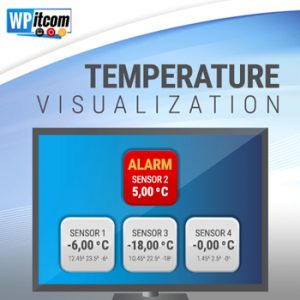
Digital Signage - Monitor Temperatures in Freezes and send alerts
Optional Modules, WPITCOM Signage Additional Options

Temperature visualization

WPITCOM S.A.
Plug-in for the configurable display of measured temperature values directly on the screen. For enhanced visual monitoring of refrigerators and freezers.
Signage Suite 3 - Emergency Communication with Digital Signage
Optional Modules, WPITCOM Signage Additional Options

Alert Manager

WPITCOM S.A.
The "Alert Manager" add-on enables the WPITCOM Display Box to listen to alert emergency requests, iniated by the WPITCOM Display Manager 2 solution in order to change the screen content to inform customers about a possible emergency situation. Content presented can be either a video, a DisplayEngine event-based playlist, a streaming website or a HTML5-template based information.
Signage Suite 3 - Connect buttons, sensors, light bariiers and other IoT hardware
Optional Modules, WPITCOM Signage Additional Options

GPIO Input (Native)

WPITCOM S.A.
The GPIO Input add-on enables the WPITCOM Display Box 2 to actively respond to General Purpose IO digital attached to the device (supported devices), Easily connect switches, light sensors, light barriers or other devices providing digital switching signals and react with changing display content by using the Eventhandler add-on.
Signage Suite 3 - Control external hardware for IoT visions
Optional Modules, WPITCOM Signage Additional Options

Hardware Director

WPITCOM S.A.
The "Hardware Director" enables the WPITCOM Display Box 2 Software to actively switch on and off external hardware devices which are connected to the GPIO ports of a supported device, enabling the application to for instance switch on a signal light or open a gate or drop a product out. The "Hardware Director" is closely connected to other add-ons like "Basic Event Receiver" for input.
Signage Suite 3 - Handle Signals from external devices and sensors
Optional Modules, WPITCOM Signage Additional Options

Basic Eventhandler Package

WPITCOM S.A.
The "Basic Eventhandler Package" add-on is used to enable the WPITCOM Display Box to send messages (Events) originating from defined external or internal sources in order to trigger different screen content based on theses events received. By also using the "Hardware Director" add-on, these message can even enable or disable GPIO-connected external devices on demand.

Signage Suite 3 - Select your playlist directly at the POS
Optional Modules, WPITCOM Signage Additional Options

Interactive Channel Selector

WPITCOM S.A.
The "Channel Selector" enables local users the WPITCOM Display Box 2 Software to actively select the playlist from the server. This add-on was developed to enable the pot-of-sale to use a mobile screen used to secondary placement of goods, but is also very useful in hospitality, banking or other services.
Signage Suite 3 - Monitor local temperature sensor in your stores
Optional Modules, WPITCOM Signage Additional Options

Temperature Sensor Connector

WPITCOM S.A.
The "Temperature Sensors" add-on enables the WPITCOM Display Box 2 Software to actively monitor temperature at up to 10 connected DS18B20 temperature sensors constantly and report frequently the temperature to a defined Nagios® server. The threshold values for warnings and alarms can be defined as well as an DisplayEngine event to be generated for each defined sensor, displaying a playlist on the screen.

Signage Suite 3 - Reduce Digital Signage COO by Infrastructure Monitoring
Optional Modules, WPITCOM Signage Additional Options

Nagios® Connector

WPITCOM S.A.
The "Nagios® Connector" add-on enables the WPITCOM Display Box to report frequently the status of different metrics to the Nagios® server. Administrators may define Nagios® notifications or conntect their service department in order to actively react on infrastrucutre or device problems at remote site.

Signage Suite 3 - Multiple Signals from Buzzers or other buttons
Optional Modules, WPITCOM Signage Additional Options

MultiEvent Connector

WPITCOM S.A.
The add-on "MultiEvent Connector" is an extension with which the WPITCOM-Display Box can monitor different input signals from keyboard devices, GPIO input pins or mouse and present variable active or passive content on the screen, depending on these events. The extension is normally used to create interactive presentations on kiosk-like systems.
Signage Suite 3 - React on GPS positions in public transportation
Optional Modules, WPITCOM Signage Additional Options

GPS Location Eventhandler

WPITCOM S.A.
The "GPS Location Eventhandler" add-on enables the WPITCOM Display Box 2 Software read and interpret GPS location from a connected supported NMEA183 device and iniate DisplayEngine events or hardware events based on a definition of locations when and where to initiate these events.

All trademarks mentioned are the property of their respective owners. Android is a trademark of Google LLC. Linux is a registered trademark.

About

WPITCOM Logo

WPITCOM SA

03007 San Lucas, Sacatepéquez Guatemala

News & Stories

  • EN-Request Demo
  • NEW: In House Programmatic Retail Media – Sell paid avertising on your shop displays easily
  • Launching WPITCOM Signage Suite 3 for Android / Android TV
  • WPITCOM releases Signage Manager 3 Version 3.2
  • New Partnership with LEDECA
  • WPITCOM announces Signage Suite 3 Player Manager
  • IT Media Consult AG becomes partner (Europe)
  • Pulse Eight Partnership
  • 4POS AG becomes partner (D-A-CH)
  • NextGen becomes partner (Germany)

Legal Information

  • Privacy Policy
  • Publisher
  • Cookie Policy (EU)
  • IT-Security & Responsible Disclosure

Popular tags

AI People Counting Alert Management Android Android Signage Article data Brand Marketing Concepts Customer frequency customer information devices Digital Marketing Digital Signage Europe Food retail Hardware Information request In House Installation Instore screens Instore TV Integration International Kiosk Kiosk Systems LED LED Solutions Linux Media Download Paid Advertising Partners Planning Player Portals Programmatic Advertising Questions & Answers Retail Retail companies Retail Media Service Videowalls Virtualization Visual Merchandising Web Portal Solution Woocommerce Wordpress XXL Display Systems

Search

Our Products

WPITCOM Digital Signage Manager 3 - Cloud Solution

Digital Signage Cloud CMS

WPITCOM Powerful Digital Signage Suite Device Controller for Android & Linux

Digital Signage Local Player Software

WPITCOM MediaCloud Logo - Contenido Brand Content para WPITCOM Signage Manager 3

Advertising Brand Content Cloud

WPITCOM Digital Signage Hardware in retail, stores and public

Hardware Players, Screens, Tablets

WPITCOM CORPORATE CAFETERIA SOLUCION

Corporate Food Order Solutions

Signage Suite 3 Interactive Application Support

Retail Consulting & Project Management

Locations / Contacts

WPITCOM (USA) LLCNorth America

WPITCOM (USA) LLC
Austin, Texas
USA

+1 (512) 617 0580
sales_usa (at) wpitcom.com

WPITCOM S.A. Latin AmericaLATAM

WPITCOM S.A.
San Lucas, Sacatepequez
Guatemala

+502 7725 1815
ventas (at) wpitcom.com

European PartnersEurope

Our Partners
Europe / Germany

Please visit
https://hyundai-itmc.com


Your words, our world — multilingual and open.

We speak EnglishHablamos EspanolWir sprechen Deutsch


Recommendations

IONOS - Official Partner
  • English
  • Español
  • Deutsch

© 2025- WPITCOM Sociedad Anónima

All trademarks mentioned are the property of their respective owners.

All rights reserved.

Content … Visit our Content Platform WPITMEDIACLOUD – Brand Content for Powerful Advertising

Manage Cookie Consent
We use cookies to optimize our website and our service.
Functional Always active
The technical storage or access is strictly necessary for the legitimate purpose of enabling the use of a specific service explicitly requested by the subscriber or user, or for the sole purpose of carrying out the transmission of a communication over an electronic communications network.
Preferences
The technical storage or access is necessary for the legitimate purpose of storing preferences that are not requested by the subscriber or user.
Statistics
The technical storage or access that is used exclusively for statistical purposes. The technical storage or access that is used exclusively for anonymous statistical purposes. Without a subpoena, voluntary compliance on the part of your Internet Service Provider, or additional records from a third party, information stored or retrieved for this purpose alone cannot usually be used to identify you.
Marketing
The technical storage or access is required to create user profiles to send advertising, or to track the user on a website or across several websites for similar marketing purposes.
  • Manage options
  • Manage services
  • Manage {vendor_count} vendors
  • Read more about these purposes
View preferences
  • {title}
  • {title}
  • {title}